
GPT Image 2 — 외부 프롬프트 리서치 배치 1
수집 단계 자료. Jake 본인 검증·인사이트 X. 외부 출처 + 간단 코멘트 수준의 Reference scrap. 본 배치는 05 Reference 정의 따라 외부 자료 + 가벼운 메모만 포함. 패턴 분석·자기 인사이트는 추후 04 Knowledge에 별도 정리.
모델 컨텍스트 (외부 보도 기반)
- 출시일: 2026-04-21 (gpt-image-2)
- 이전 버전: gpt-image-1.5 → 2.0 (대폭 개선)
- 핵심 변화:
- 네이티브 reasoning(“Thinking” 모드)
- 네이티브 2K, 4K 업스케일 옵션
- 한국어/한자/일본어 등 비라틴 스크립트 95~99% 정확도
- Codex CLI 기본 이미지 모델 (
$imagegen또는 자연어) - ChatGPT “Images 2.0” 통합
- 프롬프트 흐름 변화: “키워드 나열” → 구조화된 artifact brief (Scene → Subject → Details → Constraints, 편집은 “change vs preserve” 명시)
1. 포스터·타이포그래피
1.1 타이포그래피 포스터 템플릿
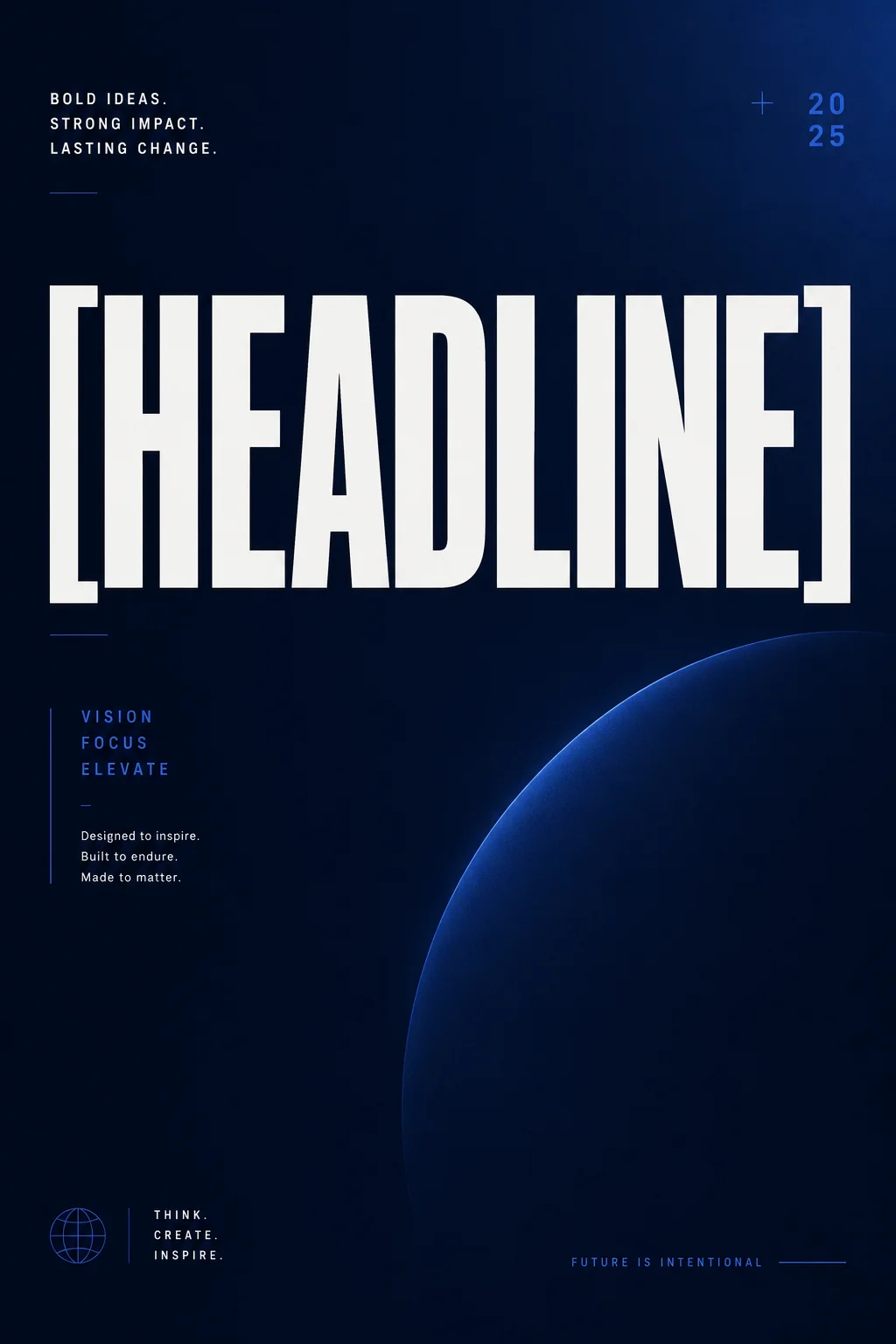
- 출처: Apiyi.com (2026-04)
- 프롬프트:
A bold contemporary typographic poster, vertical 2:3 ratio. Background: deep midnight blue gradient... Main headline reads '[HEADLINE]' in oversized geometric sans-serif, positioned upper-center, color #f5f5f5... - 결과: 다중 라인 텍스트 포스터, 위계 컨트롤 가능
- 테크닉: hex 색상 + 정확한 font weight + 공간 위치 명시. gpt-image-2가 첫 번째로 3+ 텍스트 라인을 안정적으로 렌더링하는 모델
1.2 1980s 프로파간다 포스터
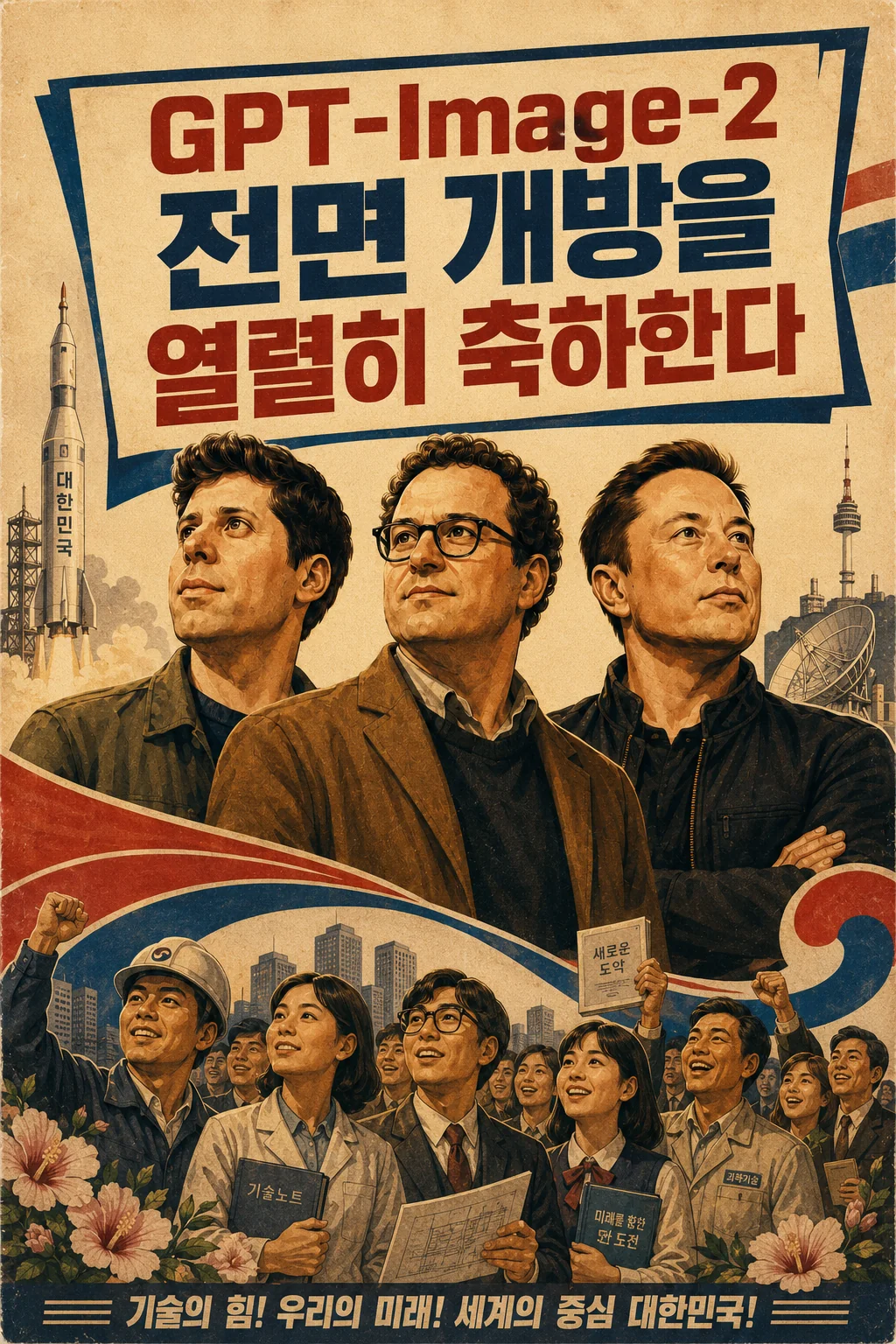
- 출처: @akokoi1 on X (via ZeroLu/awesome-gpt-image)
- 프롬프트:
Generate a 1980s propaganda poster. Use the exact slogan '热烈庆祝GPT-Image-2全量开放'. Include Sam Altman, Dario Amodei, and Elon Musk... - 테크닉: “Use the exact slogan” + 인물 명시. 한자 타이포 그대로 렌더링
- 중국 느낌을 좀 피하려고 한국풍으로 바꿔서 게시함!
1.3 Field & Flour 베이커리 로고 (n=4 변형)
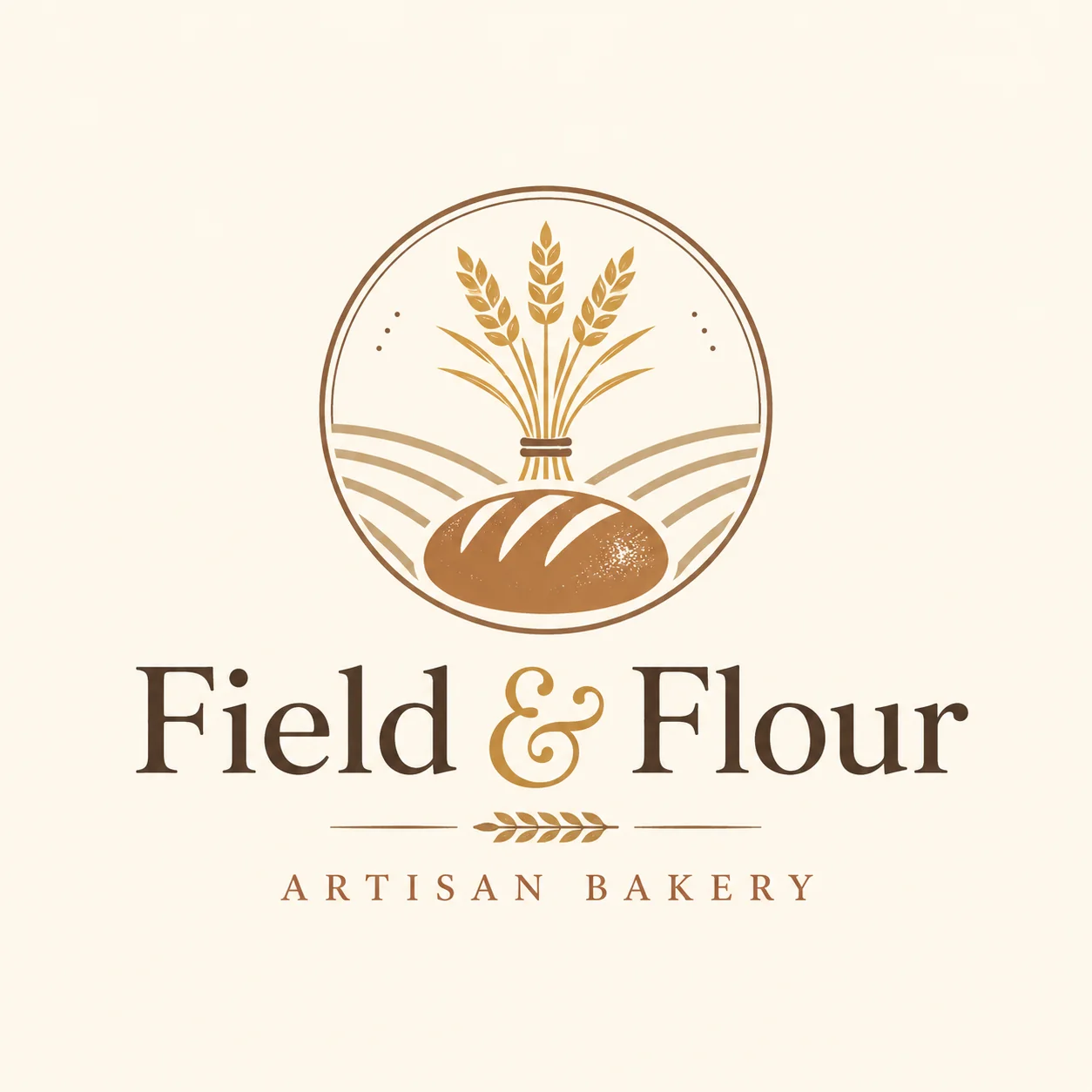
- 출처: OpenAI Cookbook
- 프롬프트:
Create an original, non-infringing logo for a company called Field & Flour, a local bakery. The logo should feel warm, simple, and timeless. Use clean, vector-like shapes, a strong silhouette, and balanced negative space... - 테크닉: API의
n=4파라미터로 변형 생성. “scalability + flat design”이 스타일 앵커
1.4 크리스마스 카드 (verbatim 텍스트 패턴)
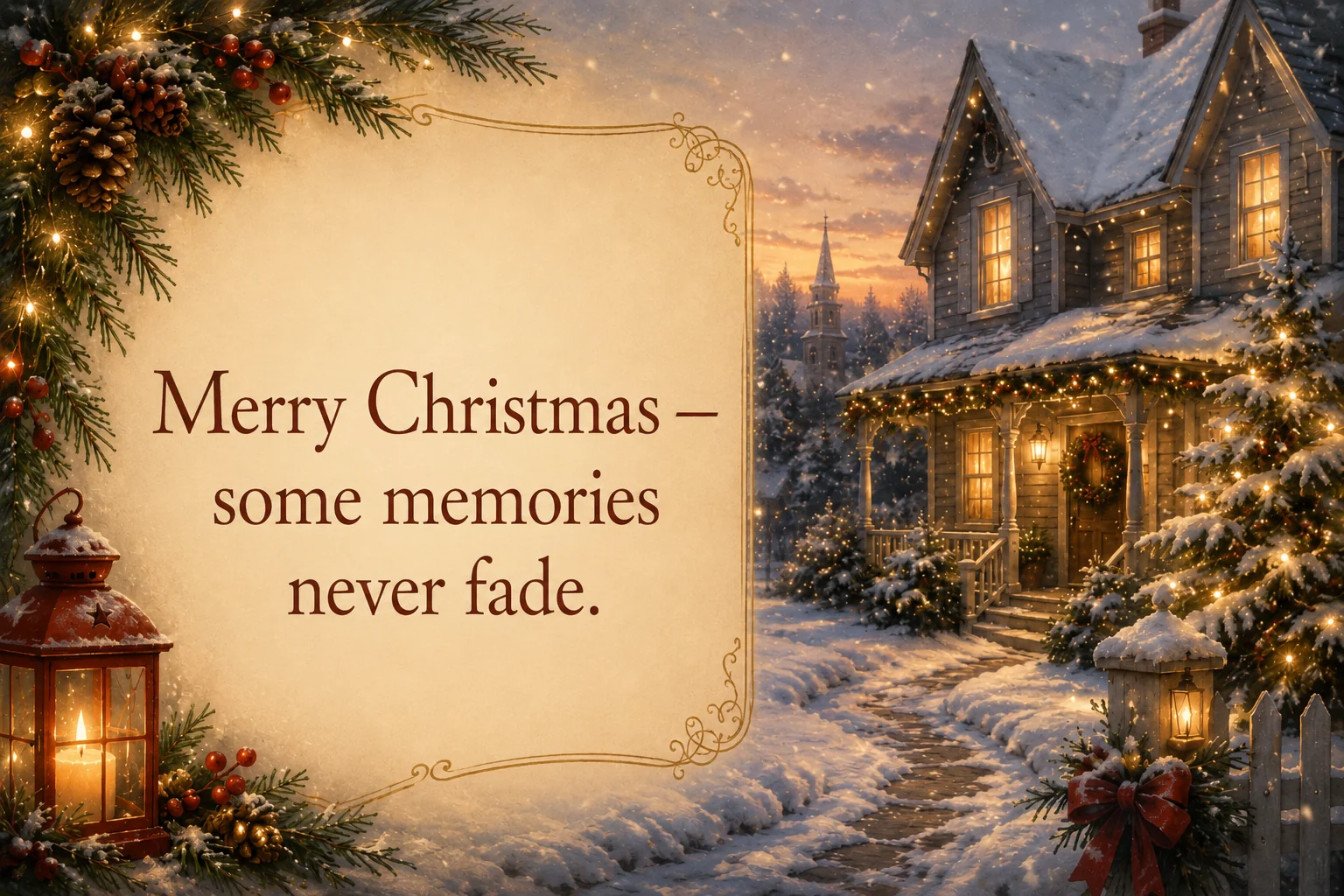
- 출처: OpenAI Cookbook
- 프롬프트:
Create a Christmas holiday card illustration... Include ONLY this card text (verbatim): 'Merry Christmas — some memories never fade.' - 테크닉:
Include ONLY this... (verbatim):패턴 — 정확한 카피 고정, 텍스트 드리프트 방지
2. 매거진 스프레드·편집 디자인
2.1 1990년대 패션 매거진 스프레드
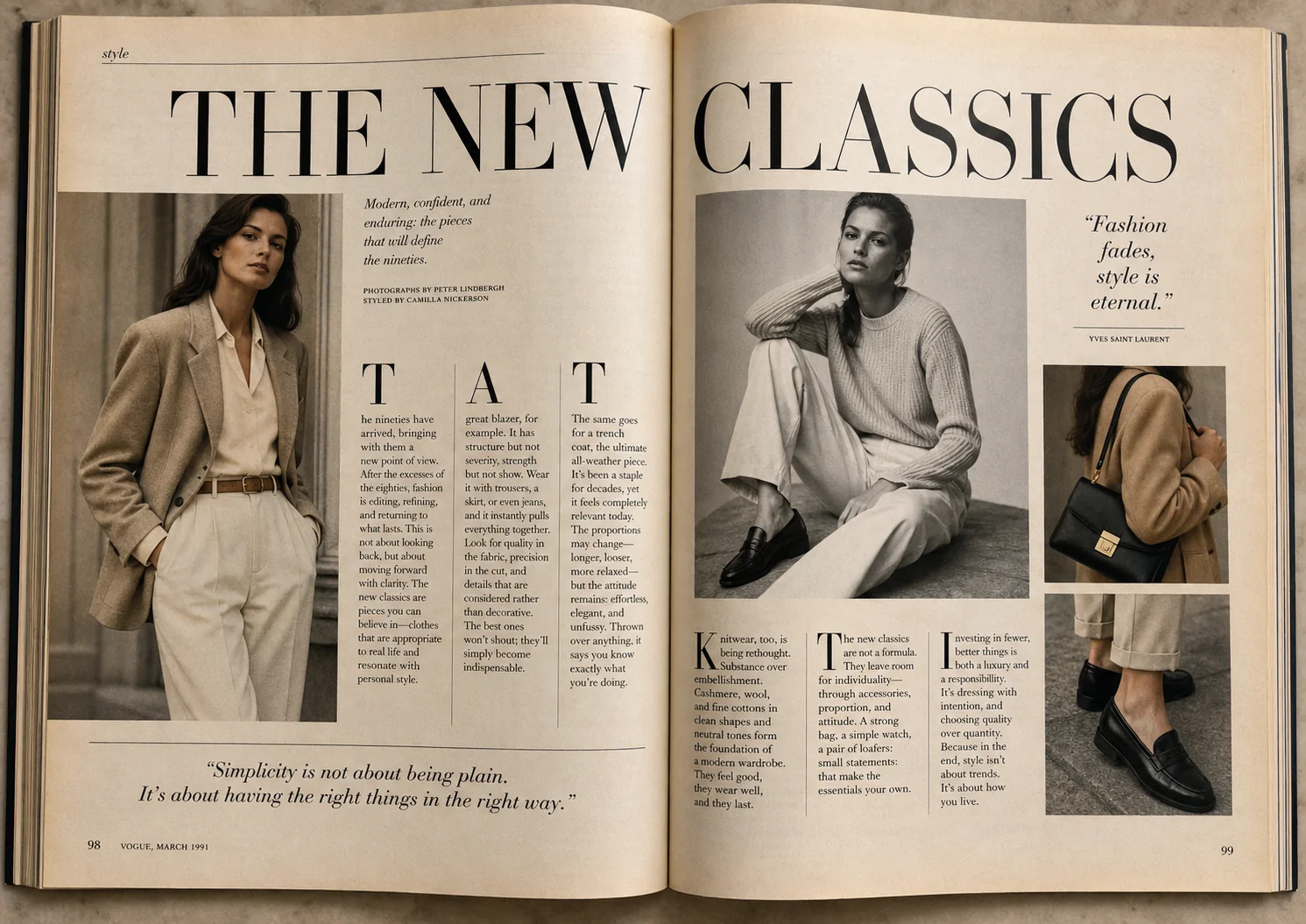
- 출처: Morphic / Imagine.art
- 프롬프트 단편:
...full two-page 1990s fashion magazine spread... bold serif headlines reading 'THE NEW CLASSICS' in uppercase, elegant italic drop caps, 3-column body text layouts... pull quotes, page numbers, thin hairline rules separating columns, vintage paper texture with slight yellowing, realistic magazine binding shadows. - 테크닉: 시대 레퍼런스 + 타입세팅 요소(드롭캡·헤어라인·바인딩 그림자) → 편집 디자인 신뢰도
2.2 커피 여정 인포그래픽 (번호 프로세스)
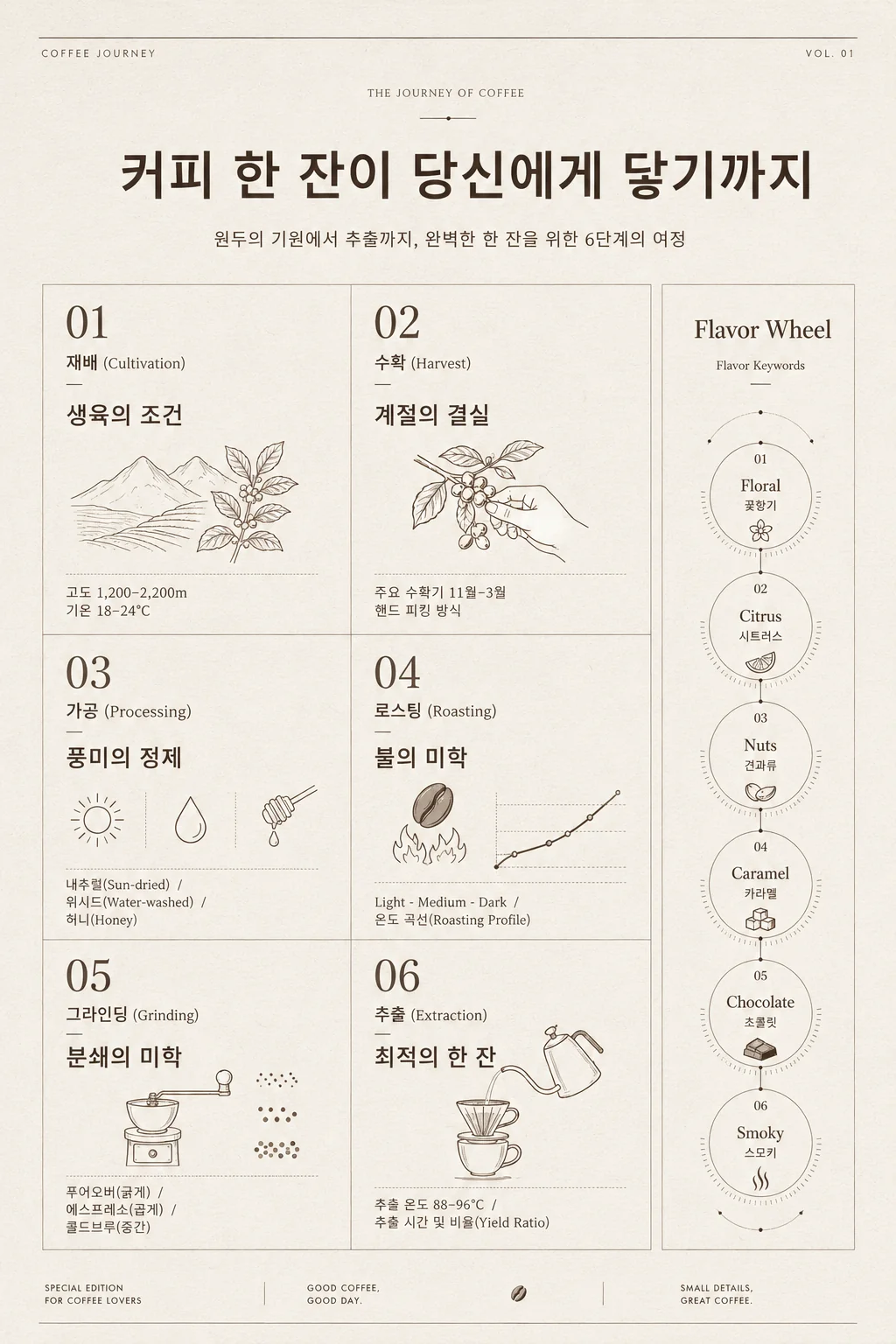
- 출처: 卡尔的AI沃茨 newsletter (中) — 원본 verbatim 프롬프트 비공개. 아래는 newsletter 설명·결과 이미지 기반으로 재구성한 레시피형 추정 프롬프트 (참고용, 검증 X).
- 테마:
"一杯咖啡 如何来到你手里"(커피 한 잔이 당신 손에 오기까지) — 번호 섹션 + 온도 데이터 + 풍미 키워드 + 모듈러 카드 - 추정 프롬프트 (재구성):
Premium magazine-style infographic poster, vertical 2:3 ratio, titled '一杯咖啡 如何来到你手里' (How a cup of coffee reaches you). Six numbered modular cards in a grid layout walking through: 01 栽培 (cultivation): altitude 1200–2200m, temperature 18–24°C 02 采摘 (harvest): November–March 03 处理 (processing): sun-dried, water-washed, honey process 04 烘焙 (roasting): light / medium / dark with temperature curves 05 研磨 (grinding): pour-over coarse, espresso fine, cold brew medium-coarse 06 萃取 (extraction): brew temperature 88–96°C, time / yield ratios Each card has a number badge, a small line icon, a one-line headline, and 2–3 data points. Side panel: flavor wheel keywords — floral, citrus, nuts, caramel, chocolate, smoky. Style: editorial infographic, warm cream background (#F5EFE6), espresso-brown accents, thin hairline rules separating cards, modern Chinese sans-serif headlines, data labels in clean monospace. Print-quality, high-density information design. Avoid clip-art, gradients, or stylized illustration. - 테크닉: 번호 프로세스 + 기술 데이터 포인트 + 모듈러 카드 그리드. 6 stage 카드 + 사이드 풍미 패널이 패턴
- ⚠️ 참고: 원본 newsletter 작성자가 verbatim 프롬프트를 공개 안 했으므로 본 항목의 프롬프트는 검증되지 않은 재구성판. 본인 사용 시 결과 차이 가능.
- 한글로 재구성!
2.3 명대 한복 박물관 카탈로그 인포그래픽
- 출처: @MrLarus on X
- 프롬프트:
Generate a museum-level Chinese disassembly infographic explaining the structure, materials, meanings, and dressing order of Ming dynasty Hanfu... - 테크닉: 고정 레이아웃 템플릿(상단 타이틀/좌측 분해/우측 재료) + “museum-level” 키워드 → 포스터 톤 X, 전문 카탈로그 톤 O
3. 인포그래픽·다이어그램
3.1 커피머신 단면도
- 출처: OpenAI Cookbook
- 프롬프트:
Create a detailed Infographic of the functioning and flow of an automatic coffee machine like a Jura. From bean basket, to grinding, to scale, water tank, boiler, etc. I'd like to understand technically and visually the flow. - 테크닉: 컴포넌트 enumeration (“from X, to Y, to Z, etc.“)이 흐름 렌더링을 유도
3.2 세포 호흡 생물학 다이어그램
- 출처: OpenAI Cookbook
- 프롬프트:
Create a simple biology diagram titled 'Cellular Respiration at a Glance' for high school students. Show how glucose turns into energy inside a cell. Include glycolysis, the Krebs cycle, and the electron transport chain. Use arrows to connect the steps, and label the main molecules: glucose, pyruvate, ATP, NADH, FADH2, CO2, O2, and H2O. Make it look like a clean classroom handout... - 테크닉: 청중 명시(“high school students”) + 명시적 라벨 리스트 + “classroom handout” 마감 레퍼런스
- ⚠️ 텍스트 dense 다이어그램은
quality="high"
3.3 역전파 교육 포스터
- 출처: EvoLinkAI/awesome-gpt-image-2-prompts (GitHub)
- 프롬프트:
Explain backpropagation in a clear educational poster with labeled neural network structure, forward pass, loss calculation, backward pass, gradients, and update steps. - 테크닉: 개념 → 라벨 워크플로 → 단계 리스트. 어떤 기술 알고리즘이든 적용 가능
3.4 Translate-in-place 편집
- 출처: OpenAI Cookbook
- 프롬프트:
Translate the text in the infographic to Spanish. Do not change any other aspect of the image. - 테크닉: 로컬라이제이션 편집 패턴. “Do not change any other aspect”이 핵심 preserve 절
4. UI·제품 목업
4.1 시리즈 A 피치덱 슬라이드
- 출처: OpenAI Cookbook
- 프롬프트:
Create one pitch-deck slide titled 'Market Opportunity' that feels like a real Series A fundraising slide from a YC-backed startup. Use a clean white background, modern sans-serif typography like Inter, and a crisp, minimal layout. The slide should include: A TAM/SAM/SOM concentric-circle diagram in muted blues and grays. Specific, believable market sizing numbers: TAM: $42B, SAM: $8.7B, SOM: $340M. A clean bar chart below showing market growth from 2021 to 2026... - 테크닉: “real, believable” 앵커 + 폰트명(Inter) + 구체적 데이터 + “avoid clip art, gradients, shadows” 네거티브
- ⚠️
quality="high"권장
4.2 DAYBREAK 투두 모바일 UI
- 출처: fal.ai
- 프롬프트 일부:
Create a clean mobile app screenshot for a minimalist to-do app called DAYBREAK. Top status bar reads 9:41 AM... (4 tasks, one checked, deep navy + cream). - 테크닉: 상태바 9:41 (애플 디폴트 트릭) + 의도적으로 구체적인 리스트 콘텐츠
4.3 NESTING 온보딩 화면
- 출처: fal.ai
- 프롬프트 일부:
Create a vertical mobile onboarding screen for a fictional app called NESTING. Headline: WELCOME TO NESTING... coral CTA, line illustration of plates/wine glasses. - 테크닉: 가상 앱명으로 트레이드마크 드리프트 방지 + ALLCAPS 헤드라인 고정
4.4 농산물 직거래 앱 + 아이폰 프레임
- 출처: OpenAI Cookbook
- 프롬프트:
Create a realistic mobile app UI mockup for a local farmers market... Place the UI mockup in an iPhone frame. - 테크닉: “Place… in an iPhone frame” → 디바이스 위 목업. “well-designed, beautiful app for a small local market”이 “shipped” 톤 잠금
4.5 SaaS 칸반 대시보드 ⭐ (Jake 관심: 주식 대시보드 적용)
- 출처: Imagine.art / scriptbyai
- 프롬프트 테마:
A SaaS dashboard for a project management tool with left sidebar navigation, main canvas with three project kanban columns... light mode with clean grid spacing, blue header accent — looks like a shipped product, not a wireframe. - 테크닉: “shipped product, not a wireframe” — 컨셉 아트 모드에서 실제 프로덕트 모드로 전환하는 매직 프레이즈
4.6 3D X(트위터) 프로필 목업
- 출처: EvoLinkAI prompts
- 프롬프트:
Create a hyper-realistic 3D illustration of a slightly tilted Twitter/X profile page, keeping the original avatar, realistic UI, verification badge, follower stats, profile banner with a 3D effect. - 테크닉: 3D 깊이 + 종이 찢어짐 트리트먼트(친숙한 UI에) → 소셜 자산 인게이지먼트 high
5. 사진·다큐멘터리
5.1 노년 어부 캔디드 사진
- 출처: OpenAI Cookbook
- 프롬프트:
Create a photorealistic candid photograph of an elderly sailor standing on a small fishing boat. He has weathered skin with visible wrinkles, pores, and sun texture... Shot like a 35mm film photograph, medium close-up at eye level, using a 50mm lens. Soft coastal daylight, shallow depth of field, subtle film grain, natural color balance... No glamorization, no heavy retouching. - 테크닉: “realistic” 대신 구체적 사진 어휘(35mm, 50mm, 필름 그레인, 피사계 심도) + “no glamorization” 네거티브
5.2 생선가게 다큐멘터리 (3:2)
- 출처: fal.ai
- 프롬프트 테마: 새벽 직후 작은 해안 시장 — 김 + 고무 부츠 + 젖은 콘크리트 + 손글씨 장부
- 테크닉: “Just after dawn” + 작은 소품 인벤토리가 다큐 톤 살림. Aspect 3:2
5.3 야간 기차 창 반사 셀프포트레이트
- 출처: fal.ai
- 프롬프트 테마: 헤드폰 낀 젊은 여행자, 밤 기차 창 반사
- 테크닉: 다층 라이팅(차가운 천장조명 + 따뜻한 외부광) + 응결 + “double-ghosted glass”. Aspect 4:5
5.4 1969년 베델 NY 군중 (Woodstock 추론)
- 출처: OpenAI Cookbook
- 프롬프트:
Create a realistic outdoor crowd scene in Bethel, New York on August 16, 1969. Photorealistic, period-accurate clothing, staging, and environment. - 테크닉: 날짜 + 장소만 줘도 reasoning 모드가 Woodstock 컨텍스트 추론 → 최소 프롬프트로 max 세계지식
5.5 곰 공격 신원 잠금 씬 (입력 이미지 + 편집)
- 출처: OpenAI Cookbook
- 프롬프트:
Generate a highly realistic action scene where this person is running away from a large, realistic brown bear attacking a campsite... Avoid cinematic lighting, dramatic color grading, or stylized composition. - 테크닉: 신원 보존 + “avoid cinematic” 네거티브 → 그라운디드 사진톤 유지
6. 한국어 텍스트 렌더링 ⭐
6.1 한국 카페 메뉴 포스터 (한글 프롬프트)
- 출처: gpters.org / 한국어 가이드
- 프롬프트:
카페 메뉴 포스터 디자인. 제목 '오늘의 커피', 한글 메뉴 5가지(아메리카노 4500원, 라떼 5000원, 카푸치노 5500원, 바닐라 라떼 5800원, 에스프레소 4000원), 베이지 배경에 미니멀한 일러스트. 2:3 세로 비율. - 테크닉: 한국어 프롬프트 + 단일 따옴표 안에 verbatim 한글 메뉴. 가격 정렬은 Thinking 모드가 자동 처리. ~99% 정확도 보고됨
6.2 한강 벚꽃길 커플 사진
- 출처: carat.im / kmjournal.net
- 프롬프트 테마:
"한강 벚꽃길을 걷는 커플 사진" - 테크닉: 순수 한글 프롬프트. 한글 깨짐률 v1.5 대비 v2에서 급감
6.3 Codex CLI 한글 태그라인 가격 페이지 히어로 ⭐
- 출처: codex.danielvaughan.com (2026-04-27)
- CLI 명령:
codex image \ --model gpt-image-2-2026-04-21 \ --refs ./brand/*.png \ --size 4096x2304 \ --prompt "Hero for /pricing. Three-tier card layout, soft volumetric light, brand teal #0F766E, Korean tagline 합리적인 가격, 명확한 가치" - 테크닉:
--refs글롭으로 브랜드 자산 일괄 첨부. 영어 구조 + raw 한글 태그라인 혼합. 첫 패스 ~98% 정확
7. Codex CLI 특화 ⭐ (Jake 관심)
7.1 $imagegen으로 대시보드 배너
- 출처: Codex CLI docs
- CLI:
codex "Create a dark-mode dashboard header banner $imagegen" - 테크닉:
$imagegen스킬 멘션으로 이미지 생성 라우트 강제
7.2 라인 아이콘 6개 배치
- 출처: Codex CLI blog
- CLI:
codex "$imagegen Generate a set of 6 monochrome line icons at 64x64: home, settings, profile, notifications, search, logout. White stroke on transparent background. 2px stroke width." - 테크닉: stroke width 명시 + transparent background + 아이콘 명시 리스트 →
~/.codex/generated_images/에 production-usable PNG
7.3 이미지→구현 워크플로
- 출처: Codex CLI docs
- CLI:
codex -i mockup-desktop.png -i mockup-mobile.png \ "Implement this design using our existing Tailwind tokens in tailwind.config.ts and the component primitives in src/components/ui/. Make it responsive." - 테크닉:
-i로 레퍼런스 첨부. 모델은 코드 편집(이미지 생성 X)
7.4 비주얼 diff 검증
- 출처: Codex CLI docs
- CLI:
codex "Open the app at localhost:3000/dashboard, screenshot it at 1440px and 375px widths, and compare with the reference mockups. List layout differences." - 테크닉: Playwright 스크린샷 + 이미지 비전 비교 결합
8. 편집·신원 보존
8.1 가상 피팅 (다중 레퍼런스)
- 출처: OpenAI Cookbook + fal.ai
- 프롬프트 (Cookbook):
Edit the image to dress the woman using the provided clothing images. Do not change her face, facial features, skin tone, body shape, pose, or identity in any way... - fal 버전:
Dress the person from Image 1 using the jacket from Image 2 and the boots from Image 3... - 테크닉: 이미지 역할 라벨링 + 신원 잠금 preserve 리스트. 최대 16개 레퍼런스 지원
8.2 매장 간판 클린업
- 출처: fal.ai
- 프롬프트:
Remove every advertising sign and poster from the shop windows in this storefront photograph. Preserve the awning, the brick facade, the mullions... - 테크닉: 전용
Preserve:절이 재구성 아티팩트/유령 방지
8.3 정밀 객체 제거
- 출처: OpenAI Cookbook
- 프롬프트:
"Remove the flower from man's hand. Do not change anything else."+input_fidelity="high" - 테크닉: 한 줄 미니멀 편집 + high input fidelity = 외과적 변경
8.4 날씨/계절 변환
- 출처: OpenAI Cookbook
- 프롬프트:
"Make it look like a winter evening with snowfall." - 테크닉: 대화 follow-up 편집. 모델이 이전 프레임 기억해서 환경만 변경
9. 특화·트렌드 템플릿
9.1 액션 피규어 블리스터 팩
- 출처: Apiyi.com (LinkedIn 4월 중 바이럴)
- 코어:
A stylized action figure of [SUBJECT] sealed inside a premium plastic blister pack... cardboard backing is glossy with a bold header reading '[BRAND/NAME]'... - 테크닉: 프리미엄 리테일 사진 프레임 + verbatim 헤더 텍스트
9.2 홀로그래픽 트레이딩 카드
- 출처: Apiyi.com
- 코어:
A premium holographic trading card, vertical 3:4 layout. Center: [SUBJECT] in dynamic pose... Border: ornate gold filigree... Top banner reads 'LEGENDARY'... - 테크닉: 5존 템플릿(서브젝트/보더/배너/아이콘/푸터)
9.3 아이소메트릭 디오라마
- 출처: Apiyi.com
- 코어:
A 45° top-down isometric miniature 3D scene of a [SCENE THEME] diorama on a wooden display base. Soft refined PBR textures, realistic materials... - 테크닉: 45° 앵글 앵커 + PBR 키워드. gpt-image-2가 재질 표현에서 경쟁자 대비 우수
9.4 시네마틱 필름 스틸 (Kodak 500T)
- 출처: Apiyi.com
- 코어:
A cinematic still from an imaginary [GENRE] film, shot on Kodak Vision3 500T 35mm film stock... teal shadows and orange highlights, slight halation around bright areas... - 테크닉: 명시 필름 스톡 + halation = LoRA 없이 정통 필름 룩
9.5 360° equirectangular 파노라마
- 출처: Apiyi.com
- 코어:
A 360° equirectangular panoramic photograph of [LOCATION]... aspect ratio 2:1... - 테크닉: 네이티브 2:1 비율 지원. VR-ready 출력
9.6 1992년 BBS 터미널 화면
- 출처: fal.ai
- 프롬프트:
Create a photograph of a 1992-era CRT monitor displaying a bulletin board system terminal... ASCII banner: THE NIGHT OWL BBS... - 테크닉: 인광 글로우 + ASCII 아트 가독 렌더링. v1.5에서 v2로 오면서 모던 UI 환각 제거
9.7 동화책 캐릭터 앵커 + 시리즈 이어가기
- 출처: OpenAI Cookbook + fal.ai
- 앵커 프롬프트:
Create a children's book illustration introducing a main character... A young, storybook-style hero... wearing a simple green hooded tunic, soft brown boots... - 이어가기 프롬프트 (앵커 이미지 레퍼런스):
Continue the children's book story using the same character... Same green hooded tunic, Same facial features... - 테크닉: 정의-한번 / 잠금-by-레퍼런스로 시리즈 일관성 유지
핵심 패턴 (외부 관찰)
- Scene → Subject → Details → Use case → Constraints — 정형 구조. 100단어 넘는 프롬프트는 섹션 사이 빈 줄.
- verbatim 텍스트는 따옴표 + “exactly once” — 카피 잠금, 중복/드리프트 방지. 헤드라인은 ALLCAPS.
- 편집 =
Change:/Preserve:두 컬럼 로직 — 둘 다 명시. “Do not change anything else”는 만능 preserve 폴백. - “realistic”보다 사진 어휘 — 렌즈, 필름 스톡, 라이팅 방향, 시간대, 그레인 명시.
- “shipped product, not a wireframe” — UI 프롬프트를 컨셉 아트 모드에서 빼는 매직 프레이즈.
quality="high"(텍스트/차트/다이어그램),medium(일반),low(대량 드래프트) — 가격: 0.006 / 0.053 / 0.211 USD per 1024².input_fidelity="high"— 외과적 편집 시 컴포지션 유지 + 한 요소만 변경.- Reasoning(Thinking) 모드 — 텍스트 정렬, 다요소 레이아웃, 차트, 외부 지식 암시 프롬프트(“내일 SF 날씨에 맞는 활동” → 모델이 예보 체크)에서 큰 차이.
- 가상 브랜드명 — 트레이드마크 드리프트 회피 + 리얼리스틱 목업 가능.
- 네이티브 비라틴 렌더링 — 한글/한자/카나 95~99% 정확도. 한국어 프롬프트도 직접 사용 가능 (트랜스리터 트릭 불필요).
- Codex
--refs ./brand/*.png글롭 — 브랜드 자산 일괄 첨부.
팔로업 가치 있는 소스
- OpenAI Cookbook —
developers.openai.com/cookbook/examples/multimodal/image-gen-models-prompting-guide— 정전급 레퍼런스 - OpenAI Devs blog / @OpenAIDevs on X — 공식 출시 글 (2026-04-21)
- fal.ai Learn —
fal.ai/learn/tools/prompting-gpt-image-2— 사진/UI 큐레이션 강함 - GitHub: ZeroLu/awesome-gpt-image — X 출처 큐레이션
- GitHub: aitools12/awesome-gpt-image-2 — 30 출처 명시 사례 (UI/인포그래픽/포스터/광고)
- GitHub: EvoLinkAI/awesome-gpt-image-2-prompts — API + 프롬프트 컬렉션
- GitHub: YouMind-OpenLab/awesome-gpt-image-2 — 2000+ 프롬프트, 16 언어
- codex.danielvaughan.com — Codex CLI 이미지젠 워크플로 (Daniel Vaughan)
- gpters.org / carat.im / flamel.app — 한국 프롬프트 리뷰 + 한글 렌더링 사례
- 卡尔的AI沃茨 newsletter / @MrLarus / @akokoi1 / @joshesye on X — 중문 포스터 + 인포그래픽 케이스 스터디
- Apiyi.com 블로그 — 프롬프트 템플릿 컬렉션 (영문 + 한국어 버전)
- the-decoder.com — Thinking 모드 + reasoning 통합 분석 글
메모
- 본 배치는 외부 자료 스크랩이라 검증 마크 X. 본인 검증 후 단일 노트로 분리 격상 가능 (현재 단일 노트화된 사례: 9:16 세로 포스터)
- 다음 배치는 본인 직접 사용해본 케이스 + 결과 이미지 기반으로 정리 예정 (Knowledge 영역 candidate)
관련
- ← Prompt Vault MOC
- 9:16 세로 포스터 (검증된 자작 패턴)
- Codex CLI 이미지 생성 가이드 (도구 사용)
- tools.md — Codex CLI ⚠️ foreground-only 운영 룰